
The office desk: quotes, calls, bookingsSoon
Quotes to follow up, logging calls, open bookings
This screen is coming soon. This is how it will work:
Office desk
The Office desk (in the side menu, under "CRM") brings together on one screen what an office manager does all day: customers, quotes, calls, closings and open bookings.
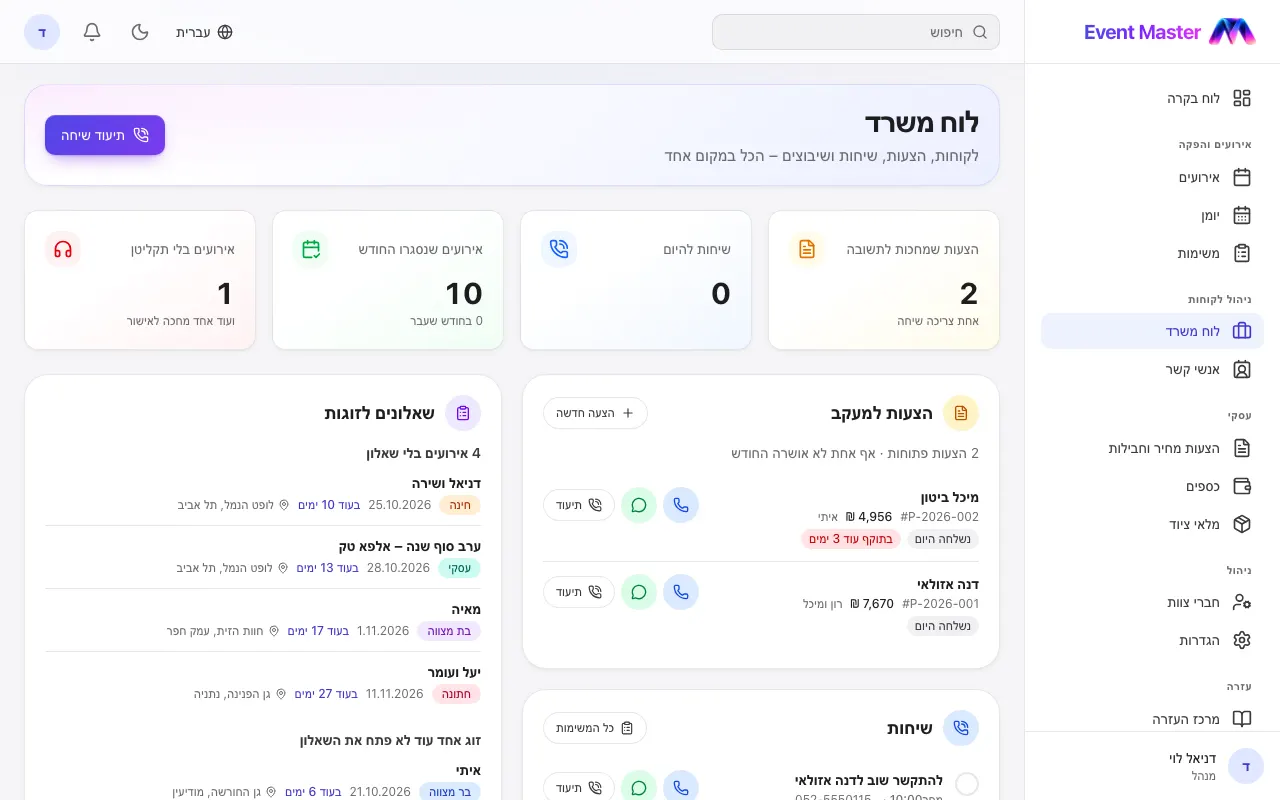
The numbers at the top
Quotes awaiting an answer (and how many need a call), calls for today, events closed this month against last month, and events without a DJ. Tap a number to jump to its part.
Quotes to follow up
Quotes that were sent and not answered yet. First come the ones waiting three days or more, or about to expire. Each line shows the customer, the amount and how long it has been waiting, and a tap gives you call, WhatsApp or Log for the call.
Calls
- Log a call - who you talked to (search for a customer, or type the name and phone of someone new), how it went (talked / no answer / left a message / asked us to call back), and what was said.
- Call them again? - tomorrow, in 3 days, in a week or another date. A call task opens in your name with a reminder that morning, and the number to call is saved in it.
- In the list: the calls to make (overdue and today's first), and below them the calls logged lately.
Calls also show on the customer's page, in the Calls card.
Open bookings, closings and questionnaires
- Open bookings - events in the next 90 days with no DJ, waiting for the DJ's answer, or whose DJ said they can't make it. With a link to the DJs' calendars.
- Recently closed - events opened in the last 30 days, compared with the month before.
- Couple questionnaires - events in the next two months with no questionnaire, where the couple hasn't opened it, or where they are halfway through - with the couple's phone.
- Customers - with an event in the next two weeks, and customers added lately.
Tip: The office desk is open to people who see the whole calendar and work with customers or quotes. Each part shows only to people allowed into its area.
Didn't find an answer?
Open a request - with a screenshot - and our team will get back to you.