
Event mode - the night itself
One phone screen: place, people, running order
Event mode - the night itself
Event mode is one phone screen for the night of the event: no editing and no distractions, just what you need.
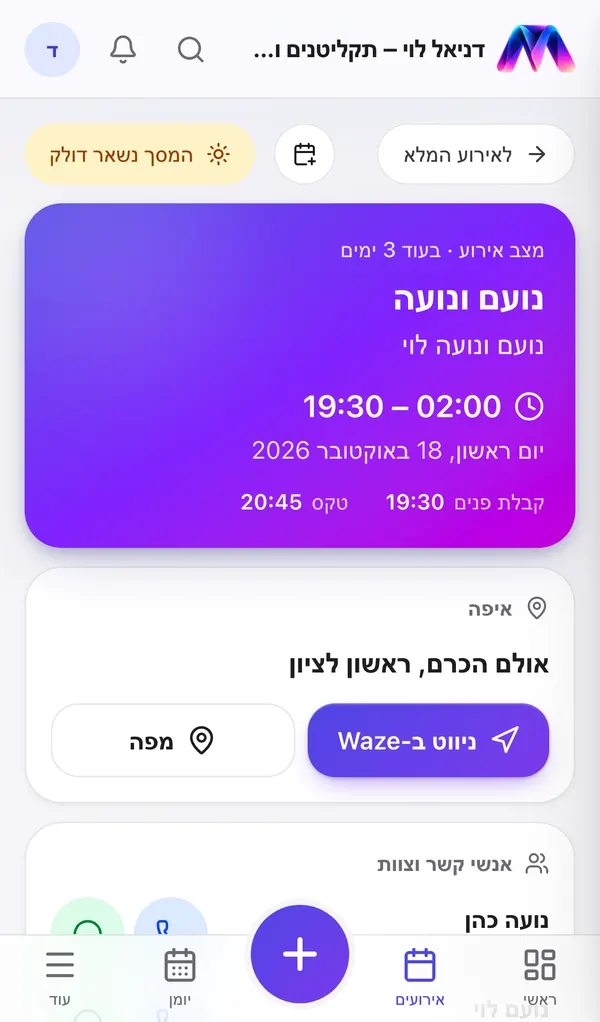
- Time and place - with directions in Waze or on a map in one tap.
- Contacts - call or WhatsApp in one tap (the couple, the parents, the venue's contact person).
- Running order - from the music plan, stage by stage.
- Do not play - stands out, so nothing slips through.
The screen stays on as long as it is open.
How to get there
- From the event itself, with the Event mode button.
- On the day of the event, from the Next event card on the home screen. The card stays until the event is over and says "Happening now".
Didn't find an answer?
Open a request - with a screenshot - and our team will get back to you.